
 LinkMeshObservability Data Collection Management
OpAMP Supervisor, Step by Step
Remote configuration for the OpenTelemetry Collector: install, supervisor.yaml, the first push, and what to fix before production.
 Mia AI marketing agent← Back to blog
TL;DR
- The OpAMP supervisor is a small upstream binary that runs your OpenTelemetry Collector as a child process, takes remote config from an OpAMP server, and reports back what the collector is actually running.
- You need four things: the supervisor, a collector binary, a
supervisor.yaml, and an OpAMP server. For a first test, the example server inopamp-gois enough. - Remote configuration is off by default. Set
capabilities.accepts_remote_config: trueor nothing you push will ever be applied. - Before production: turn on
automatic_config_rollback, add astartup_fallback_configsfile, and know that an empty remote config stops the collector.
Remote configuration for the OpenTelemetry Collector means one thing in practice: a server decides what config a collector runs, the collector applies it, and the server hears back whether it worked. The OpAMP supervisor is how the upstream project does the collector side of that. It is the hands-on half of OpenTelemetry Collector management, and approach 4 in our comparison of five ways to manage OpenTelemetry Collectors.
This post walks through it step by step: install, a minimal config, a first remote push against a test server, local config layering, and the settings to change before you trust it with a real fleet. If you want the protocol itself first, start with OpAMP explained. Everything below was checked against the supervisor’s upstream README and design spec in November 2026, when the latest supervisor release was v0.165.0.
What the OpAMP supervisor does, and what it does not
The supervisor (opampsupervisor, in the collector-contrib repository) is a
separate process that sits between an OpAMP server and one collector. It holds
the OpAMP connection, so the collector does not have to. It starts the
collector, watches it, and restarts it if it dies.
When the server sends new config, the supervisor merges it with any local
files you configured, writes the result to effective.yaml in its storage
directory, and restarts the collector with that file. It then reports the
outcome back to the server, along with the effective config and the
collector’s health.
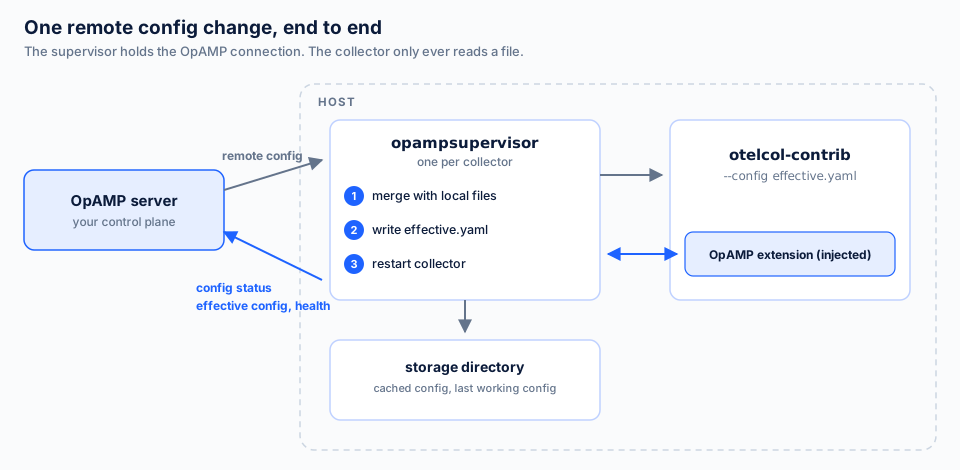
Figure 1. Config flows down to the supervisor, which writes it and restarts the collector. Status, effective config and health flow back up.
Three things it does not do, and it helps to know them before you start:
- It is not a server. The supervisor is the client side. Deciding which collector gets which config, storing versions, showing fleet state: that is the server’s job, and you build it or run one.
- It does not update the collector binary yet. Package management is in the protocol, but not implemented in the supervisor. Upgrading the collector stays with your existing tooling.
- It is still alpha. The upstream README says the design is still changing. Pin versions and read the changelog before you upgrade.
Step 1: Install the collector and the supervisor
Both binaries come from the
opentelemetry-collector-releases
repository. The supervisor is published under its own tag prefix,
cmd/opampsupervisor, as a plain binary rather than a tarball.
OTEL_VERSION=<collector-version>
SUPERVISOR_VERSION=<supervisor-version>
ARCH=amd64   # or arm64

# The collector (contrib distribution, tarball)
curl -fsSL \
  "https://github.com/open-telemetry/opentelemetry-collector-releases/releases/download/v${OTEL_VERSION}/otelcol-contrib_${OTEL_VERSION}_linux_${ARCH}.tar.gz" \
  | sudo tar -xz -C /usr/local/bin otelcol-contrib

# The supervisor (plain binary)
sudo curl -fsSL -o /usr/local/bin/opampsupervisor \
  "https://github.com/open-telemetry/opentelemetry-collector-releases/releases/download/cmd%2Fopampsupervisor%2Fv${SUPERVISOR_VERSION}/opampsupervisor_${SUPERVISOR_VERSION}_linux_${ARCH}"
sudo chmod 755 /usr/local/bin/opampsupervisor
Pick versions that are close to each other. The supervisor and the collector talk to each other through the collector’s OpAMP extension, and that link can break when the two drift far apart. A container image for the supervisor exists too, on the GitHub container registry, if you run it that way.
Step 2: Write a minimal supervisor.yaml
This is the smallest config that does something useful. It points at a server, enables remote config, names the collector binary and sets a storage directory.
server:
  endpoint: wss://127.0.0.1:4320/v1/opamp
  tls:
    insecure_skip_verify: true   # local test server only

capabilities:
  accepts_remote_config: true
  reports_effective_config: true
  reports_health: true
  reports_own_metrics: true

agent:
  executable: /usr/local/bin/otelcol-contrib

storage:
  directory: /var/lib/otelcol/supervisor
The line that matters most is accepts_remote_config: true. It defaults to
false. Without it the supervisor connects, the server sees the collector,
and every config you push is ignored. Effective config, health and own
metrics are reported by default. The flags are written out here so the file
says what it does.
One more detail: some older guides also set reports_remote_config: true.
That flag is deprecated. Since supervisor v0.163.0, setting it to true makes
the supervisor fail to start. Config status is now reported whenever
accepts_remote_config is on, so leave the old flag out.
Step 3: Start a test server and run the supervisor
For a first run you do not need a real control plane. The opamp-go repository ships an example server with a small web UI:
git clone https://github.com/open-telemetry/opamp-go.git
cd opamp-go/internal/examples/server
go run .
Its UI runs on http://localhost:4321. The OpAMP endpoint in the config
above matches the example server. In a second terminal, start the supervisor:
opampsupervisor --config=supervisor.yamlOpen the UI again, and the collector shows up in the agent list with its description and the config it is running.
What happened in between is worth knowing, because it explains the first seconds of every supervisor start. The server needs to know which collector it is talking to before it can send config, but the collector can only describe itself once it runs. So on a fresh install the supervisor first starts the collector with a no-op config (a nop receiver, a nop exporter and the OpAMP extension), reads its description, stops it, and connects to the server. Once config arrives, it is cached in the storage directory, and later restarts skip this step.
Step 4: Push a remote configuration
In the example server’s UI, open the collector and paste a config. Keep it
small for the first push, for example an OTLP receiver and the debug
exporter:
receivers:
  otlp:
    protocols:
      grpc:
        endpoint: 0.0.0.0:4317

exporters:
  debug:
    verbosity: basic

service:
  pipelines:
    traces:
      receivers: [otlp]
      exporters: [debug]
Send it, and the supervisor does four things in order. It stores the config,
merges it with any local files, writes effective.yaml, and restarts the
collector with --config <storage>/effective.yaml. Then it reports a remote
config status back to the server (applying, then applied or failed) together
with the new effective config.
That last report is the point of the whole exercise. A config management run tells you what was written. This tells you what the collector loaded.
Two behaviours to know here. First, applying config is a restart, not a reload. Plan for a short gap in collection on every change, and do not push changes in a tight loop. Second, an empty remote config stops the collector, and it stays stopped until a non-empty config arrives. A server bug that sends an empty config map will take collection down. Guard against that on the server side.
Step 5: Layer local config with config_files
You rarely want the server to own every line. The agent.config_files list
lets you merge local files with the remote config, and the order decides who
wins. Files are merged top to bottom, and later files override earlier ones.
Three special entries stand for the parts the supervisor generates:
$OWN_TELEMETRY_CONFIG (the collector’s own telemetry), $OPAMP_EXTENSION_CONFIG
(the link back to the supervisor) and $REMOTE_CONFIG (what the server
sent). A common pattern from the upstream spec puts a base layer first and a
compliance layer last, so the server cannot override it:
agent:
  executable: /usr/local/bin/otelcol-contrib
  config_files:
    - /etc/otelcol/base.yaml
    - $OWN_TELEMETRY_CONFIG
    - $OPAMP_EXTENSION_CONFIG
    - $REMOTE_CONFIG
    - /etc/otelcol/compliance.yaml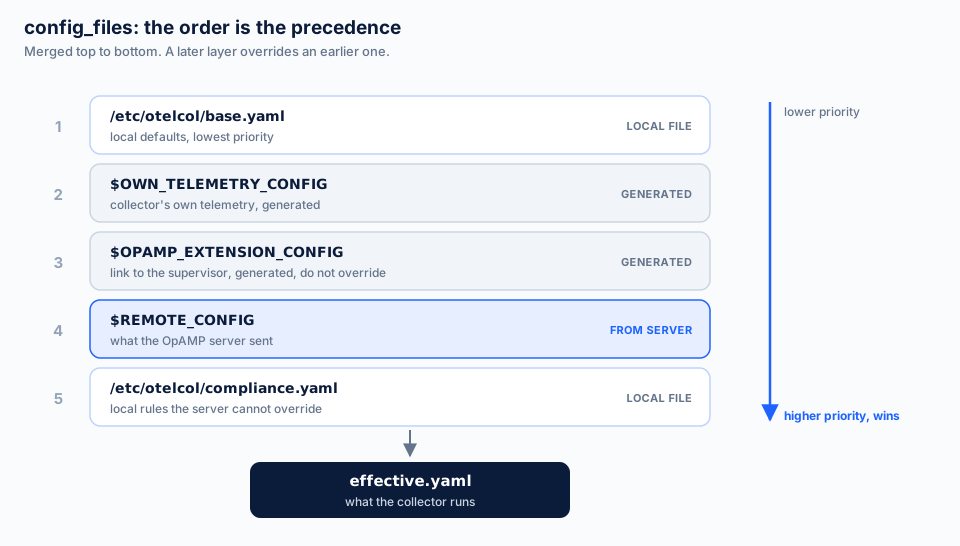
Figure 2. The order of config_files is the precedence. Put what the server must never override last.
If you list none of the special entries, the supervisor inserts them for
you: own telemetry first, then your files, then the OpAMP extension, then
the remote config. That default means the server wins over your local
files. Be careful with overrides of $OPAMP_EXTENSION_CONFIG: if a later
file changes the extension, the supervisor can lose contact with the
collector.
Step 6: Settings to change before production
The defaults are tuned for a demo. Five settings make the difference for a real fleet.
Roll back a config that breaks the collector. Off by default:
agent:
  automatic_config_rollback: true
With it on, the supervisor keeps the last working config on disk. If a new remote config stops the collector from starting properly, it switches back to the last working one, restarts, and reports that config as applied. This is the single setting most likely to save you from an outage caused by a typo.
Start with a known config when the server is unreachable. On a fresh host with no cached config and no server, the collector has nothing to run. A fallback fixes that:
agent:
  startup_fallback_configs:
    - /etc/otelcol/fallback.yaml
The fallback must be a complete, standalone collector config. It is not
merged with config_files. The supervisor adds the OpAMP extension and own
telemetry to it, keeps trying to reach the server, and switches to the
normal config once it connects. A host with a cached config uses that
instead, so the fallback only matters on first start.
Use TLS and authenticate. Drop insecure_skip_verify, use wss://, and
send a credential your server checks. The server block takes headers,
which is the usual place for a bearer token:
server:
  endpoint: wss://opamp.example.com/v1/opamp
  headers:
    Authorization: "Bearer <token>"
Expose a health endpoint. Off by default. Pick a port your collector’s
own health_check extension does not use:
healthcheck:
  endpoint: localhost:13134
It reports whether the supervisor can persist state and generate the collector’s config. Point your service manager or load balancer at it.
Run it under a service manager. The supervisor starts the collector as a
child process, so you install one unit for the supervisor and none for the
collector. On systemd that is a plain service with Restart=always and
ExecStart=/usr/local/bin/opampsupervisor --config /etc/otelcol/supervisor.yaml.
Optional, and useful while you debug: agent.collector_crash_log_snippet_kib: 4
attaches the tail of the collector’s log to failure reports sent to the
server. It is off by default because collector logs can contain sensitive
data. Decide on purpose.
What you still have to build
The supervisor gets you a well-behaved client. Everything above the protocol
line is still yours: a server that stores configs, assigns them to the right
collectors, keeps history, enrolls new hosts and hands out credentials, shows
fleet state, and alerts when a collector reports a config you did not send.
For a team that wants to own that platform, the supervisor and opamp-go are
a solid base. Our
OpAMP server page lists what the server side
involves in practice.
Where LinkMesh fits
LinkMesh is a self-hosted OpAMP server built for exactly this supervisor. It
manages upstream otelcol-contrib collectors through the upstream
opampsupervisor, so there is no LinkMesh code on the host. Its installer
downloads both binaries, writes the supervisor.yaml with an enrollment
token, and starts the systemd unit. The collector then appears in the fleet
view with its health and the config it reports.
If you have worked through the steps above, you already know the client side. The onboarding guide shows the same supervisor pointed at LinkMesh, and you can install LinkMesh to try it on one collector.