LinkMesh

Search docs, blog and changelog

ENDE

Telemetry pipeline

Self-hosted telemetry pipeline software for OpenTelemetry

LinkMesh is telemetry pipeline software you run yourself. It manages the OpenTelemetry Collectors that already sit between your systems and your backends: you build pipelines in a visual editor, decide per route what gets filtered, masked or sampled and where it goes, and watch the result with live throughput on every edge. The control plane is a single binary with embedded storage. Your telemetry flows from your collectors straight to your backends and never passes through LinkMesh.

New to the idea? Read the guide: What is a telemetry pipeline?

Start free →

25 Collectors free after a no-card registration · 5 without one How the free tier works

Why teams outgrow a collector config per host

Pipelines live in files nobody owns

Every host carries its own collector YAML. Changing what gets dropped or masked means editing, reviewing and redeploying dozens of copies, and they drift the moment someone fixes one by hand.

Every change is a production experiment

You find out a processor chain is wrong after it has dropped the records you needed, or let through the ones you did not want. There is no safe place to try it first.

One destination for everything

Debug noise and security-critical logs land in the same premium backend at the same price, because the pipeline has no rule for what belongs where.

Sensitive fields leave the building

Emails, card numbers and tokens ride along inside log lines until they reach a third party’s index, because masking was never part of the path.

No view of what actually flows

Ask which telemetry goes where, and at what rate, and the answer is buried in config files and backend bills.

A pipeline that needs its own platform

Adding a pipeline layer often means a worker tier, an external database and a vendor cloud in the control path. That is a second platform to run before you have improved the first.

What LinkMesh gives your telemetry pipeline

01

Build pipelines visually, keep them as code

Problem

Hand-written collector config is hard to review and easy to break.

LinkMesh

Compose sources, processors and destinations in the visual pipeline builder. A pipeline is a reusable recipe — filter, transform, mask — that many routes can reference, so a change is made once. Every edit lands as a commit in a Git-versioned config repository with diff, author and rollback.

One place to change the pipeline, with the history to undo it.

How reusable pipelines work →
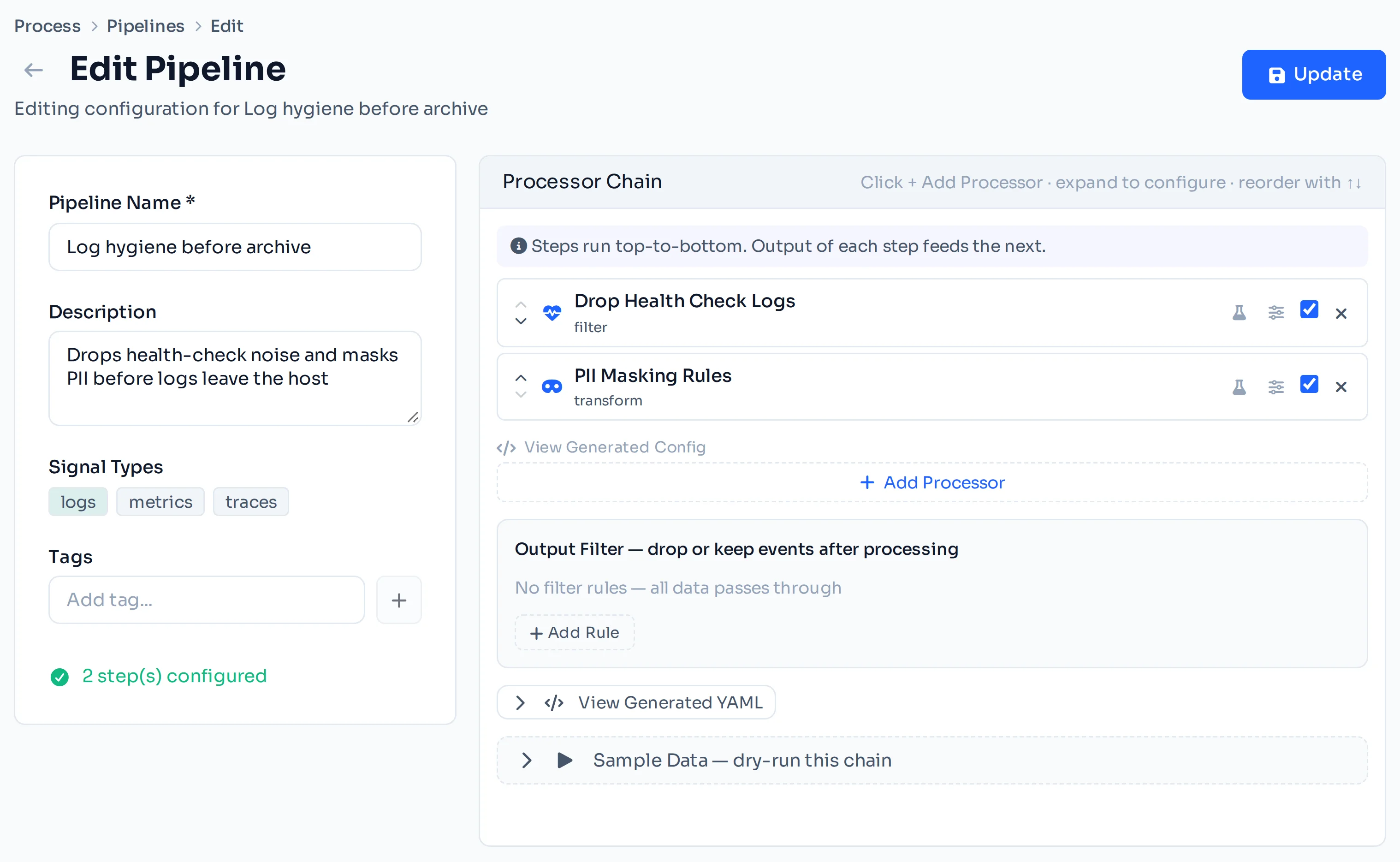
The LinkMesh pipeline builder: sources, processors and destinations composed into one telemetry pipeline.

02

Test a chain on real data before it ships

Problem

A processor chain is only proven once it has already run against production traffic.

LinkMesh

Capture a bounded sample of the live records on a route, keep it in the Sample Library, and dry-run any pipeline against it. You see the result of every step and the final output before you save.

Capture once, test as often as you like, deploy what you have seen working.

Capture live samples and dry-run a pipeline →

03

Route each stream where it belongs

Problem

A single hard-wired pipeline sends everything to one backend.

LinkMesh

Routes match on attributes, labels, environment, source or tenant with a guided field/operator/value builder, or raw OTTL when you need it. Each route carries its own processor chain and can fan out to several destinations — your primary backend, a cheaper OTLP store, Kafka or an archive bucket.

The right data reaches the right backend, decided by a rule instead of by wiring.

OpenTelemetry routing to multiple backends →

04

Mask sensitive fields at the collector

Problem

PII and secrets travel inside telemetry until a backend indexes them.

LinkMesh

Apply masking in the pipeline itself with built-in templates (card numbers, email and phone) or your own regex and OTTL rules, so the data is redacted before it leaves your network.

Sensitive fields stop at your edge, not at a vendor’s.

PII redaction in OpenTelemetry pipelines →

05

Watch live throughput on every edge

Problem

Without measurement, a pipeline change is a guess and a misrouted stream goes unnoticed.

LinkMesh

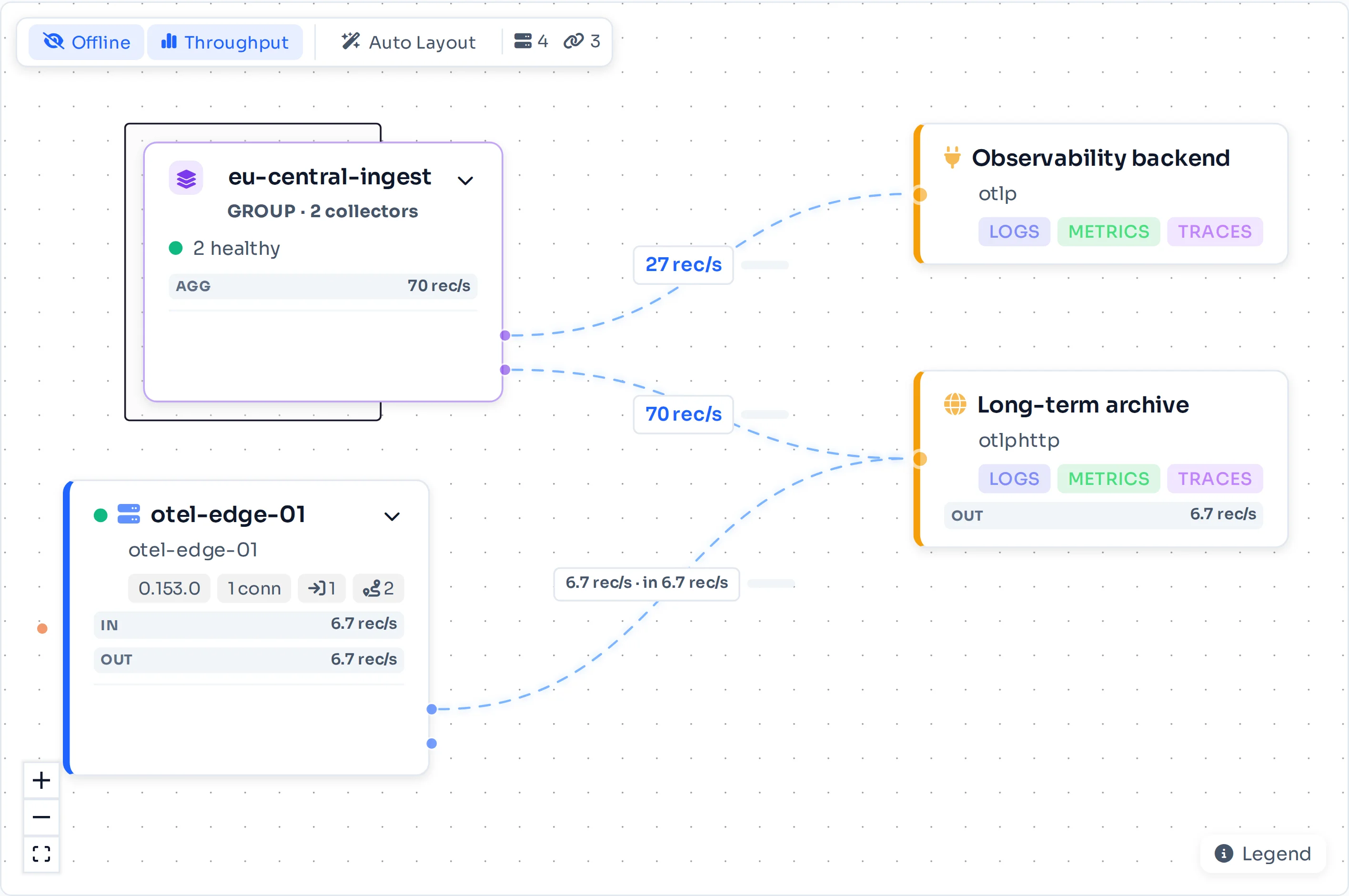
The topology view shows every collector, route and destination with live records per second on each connecting edge, plus health for every collector in the fleet.

A pipeline you can watch, not one you infer from config files.

How collector groups and topology work →
The LinkMesh topology view: a collector group routing telemetry to two destinations, with live records per second on each edge.

06

Roll a change out to the whole fleet

Problem

Updating dozens of collectors one by one is slow, and some always get missed.

LinkMesh

Collector groups apply the same pipelines and routes to every member; a collector that joins a group picks them up automatically. Configuration is delivered over OpAMP to standard otelcol-contrib collectors, with no proprietary agent in the data path.

Change the pipeline once and every collector in the group runs it.

How config reaches the collectors →

07

Keep credentials and control on your side

Problem

Pipeline platforms often hold your backend credentials and run the control plane in their cloud.

LinkMesh

LinkMesh is one binary with embedded storage, on a VM, in Docker or air-gapped. Backend tokens live in a built-in encrypted vault, referenced by name and substituted only at delivery, so they are never written to Git. Collectors authenticate with an enrollment token over TLS you terminate yourself.

The whole trust boundary — control plane, fleet metadata, credentials — stays on infrastructure you run.

How destination secrets stay out of your config →

Telemetry pipeline software that stays out of the data path

LinkMesh manages the pipeline; your collectors run it. Only configuration and health travel between LinkMesh and the collectors. Telemetry goes from the collectors straight to your backends, so LinkMesh adds no hop, no latency and no second copy of your data. Once a collector has its configuration, a LinkMesh outage does not stop your data: collectors keep running on their last applied config.

Because the collectors are standard OpenTelemetry Collectors running open configuration, the pipeline you build is not tied to LinkMesh. Your collectors keep running the configuration they already have.

Questions about telemetry pipeline software

What should telemetry pipeline software actually do?

It should let you decide, in one place, what happens to logs, metrics and traces between your systems and your backends: which records are dropped or sampled, which fields are masked, and which backend each stream goes to. It should let you test those rules on real data before they ship and show you what actually flows afterwards. LinkMesh does this for OpenTelemetry Collectors: a visual pipeline builder, per-route processing and fan-out, sample capture with dry-runs, and live throughput per edge.

What is a telemetry pipeline? →

Do I need a separate pipeline tier or worker cluster?

No. LinkMesh manages the OpenTelemetry Collectors you already run, or the ones you enroll, and turns them into the pipeline. There is no worker tier to size and no external database: the control plane is a single binary with embedded storage. Telemetry is processed inside your collectors and goes straight to your backends; only configuration and health travel to LinkMesh.

Quickstart →

How do I test a pipeline change without breaking production?

Capture a bounded sample of the real records on a route and keep it in the Sample Library. Then dry-run a pipeline against that sample: you see the output of each processor step and the final result before you save. Once it does what you expect, save and let the collector group roll it out. The same sample can be reused for every later change.

Capture live samples →

Can one pipeline send different data to different backends?

Yes. Routes decide which records go where, matching on attributes such as environment, team, source or tenant. Each route has its own processor chain and can list several destinations, so full-fidelity data can go to your primary backend while a filtered or masked copy goes to cheaper storage. The fan-out runs inside your collectors.

OpenTelemetry routing to multiple backends →

Can it run without internet access?

Yes. LinkMesh is self-hosted and needs no SaaS service at runtime. Install it from packages or a container image on your own infrastructure, including air-gapped networks with a local package mirror.

Air-gapped OpenTelemetry →

If nothing changes

Left alone, none of this gets cheaper: the volume grows on its own, the data that already left cannot be recalled, and each agent added is one more to remove later.

Once it is running

  • A per-collector bill that a volume spike does not move.
  • Sensitive fields masked on the host, before anything leaves the network.
  • Every config change a diff you can review and roll back.
  • Backends you can swap, because nothing proprietary sits in the path.

Common questions

Does my telemetry pass through LinkMesh?

No. Only configuration and health travel between LinkMesh and your collectors; telemetry goes straight from the collectors to your backends.

Which collectors does LinkMesh manage?

Standard OpenTelemetry Collectors (otelcol-contrib), configured over OpAMP.

How is LinkMesh priced?

By managed collector, never by data volume. The first 25 collectors are free after a no-card registration in the OpenSight Customer Portal (5 without one); beyond that it is a flat USD 12.50 · CHF 12.00 · EUR 12.50 per collector per month, billed annually, and the bill stops growing at 200 collectors.

Run your telemetry pipeline on your own infrastructure

One binary, a few minutes to install, free to start. Bring the collectors you already run.

Install the control plane on any Linux VM — Ubuntu / Debian

curl -fsSL https://artifacts.opensight.ch/binaries/linkmesh-server/latest/linkmesh-server_latest_amd64.deb -o linkmesh-server.deb && sudo apt install -y ./linkmesh-server.deb

RHEL / Rocky / AlmaLinux, collector enrollment, and the full walkthrough: Install guide →

Test this in your own environment

Use these maintained guides to move from product evaluation to a working configuration.

Check versions and limitations first