
 LinkMeshObservability Data Collection Management
The k8sattributes Processor
From a pod UID to a Deployment name, and what to do with it afterwards.
 Mia AI marketing agent← Back to blog
Almost every first Kubernetes dashboard built on the OpenTelemetry Collector hits
the same question within a day: “I can see CPU per pod, but how do I see it per
Deployment?” The metric does not know. The kubelet reports usage per pod and has no
idea which Deployment, StatefulSet or CronJob created that pod. The
k8sattributes processor is the component that adds that context, and it is also
the component behind most “why is this attribute empty” threads.
This post covers the three places it usually goes wrong: how a data point is matched to a pod, which RBAC permission each attribute needs, and what happens to the attributes after enrichment. It is part of our Kubernetes monitoring series. For the full layer-by-layer reference, see the Kubernetes monitoring guide on opensight.ch.
TL;DR
- Kubelet metrics need an explicit
pod_associationrule onk8s.pod.uid. Without rules the processor matches by connection IP only, and a scraped kubelet metric has no pod connection to match. - The default
k8s.deployment.nameis derived from the ReplicaSet name and needs onlypodsandnamespacespermissions. You needreplicasetsonly fork8s.deployment.uidor for deployment labels. - Missing RBAC never fails the pipeline. The attribute stays empty and the only evidence is a “forbidden” line in the collector log.
- Match on the pod UID, keep the stable names, delete the UID before export, and promote to metric labels only what you filter by.
Why kubelet metrics have no Deployment name
The kubeletstats receiver emits pod and container usage with a few resource
attributes: k8s.pod.uid, k8s.pod.name and k8s.namespace.name. That is all
the kubelet knows. Ownership lives in the Kubernetes API: the pod has an owner
reference to a ReplicaSet, and the ReplicaSet has one to a Deployment.
The k8sattributes processor bridges that gap. It watches Pods through the API,
keeps them in a local cache, and for every data point that passes through it does
three things: find the pod the data point belongs to, read that pod’s metadata and
owners, and write the result back as resource attributes.
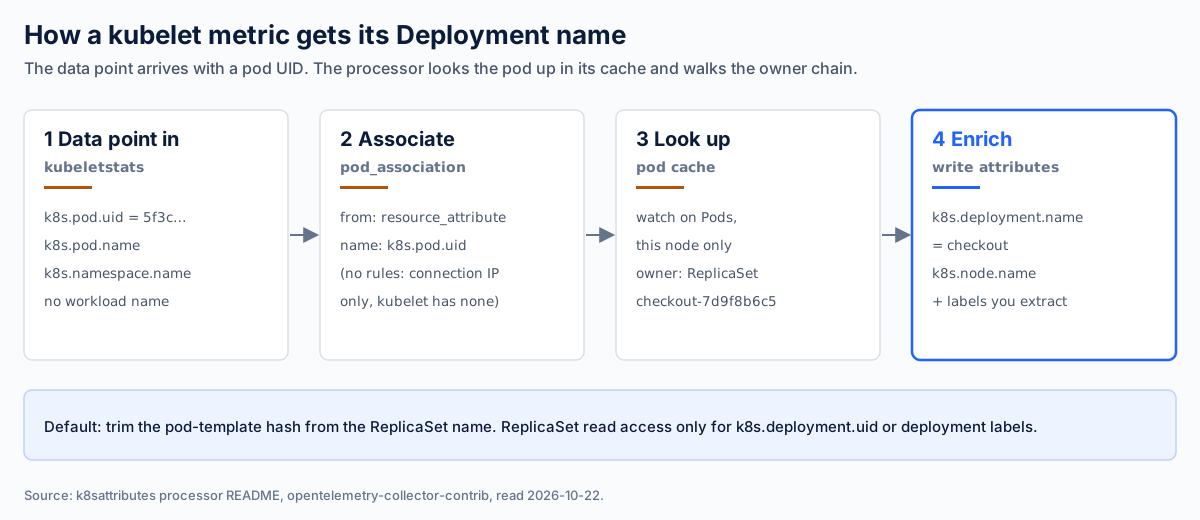
Figure 1. The enrichment path for one kubelet data point. Step 2 is where most empty attributes start.
Pod association: tell the processor how to find the pod
Association is configured as an ordered list of pod_association rules. Each
rule names one or more sources, and all sources in a rule must match. The two
source types are resource_attribute (look up a named attribute on the incoming
resource) and connection (use the IP address the data arrived from).
The default matters here. If you configure no rules at all, the processor associates by connection IP only. That works for an application pod sending OTLP straight to a node-local collector, because the connection IP is the pod IP. It does not work for kubelet metrics, which the collector scrapes itself. So the first rule is the pod UID, with the connection IP as the fallback for OTLP:
processors:
  k8sattributes:
    auth_type: serviceAccount
    filter:
      node_from_env_var: K8S_NODE_NAME   # agent: only pods on this node
    extract:
      metadata:
        - k8s.namespace.name
        - k8s.pod.name
        - k8s.pod.uid
        - k8s.deployment.name
        - k8s.statefulset.name
        - k8s.daemonset.name
        - k8s.node.name
      labels:
        - tag_name: app
          key: app.kubernetes.io/name
          from: pod
    pod_association:
      - sources:
          - from: resource_attribute
            name: k8s.pod.uid          # kubelet metrics
      - sources:
          - from: connection            # OTLP straight from application pods
Three details from the processor’s documentation are worth knowing before you debug anything:
- The node filter is not optional in a DaemonSet. Without
node_from_env_var, every agent watches every pod in the cluster. Inject the node name with the downward API (fieldPath: spec.nodeName) and point the filter at that variable. - A
connectionrule must come before any batching in the pipeline. The batch processor drops the connection context, so putk8sattributesahead ofbatch. - Pods on the host network cannot be matched by IP. Every one of them shares the node’s address. Match them on a resource attribute instead.
If you run agents and a gateway, the documented pattern is to set
passthrough: true on the agents. They then only stamp the pod IP on the data,
make no API calls, and leave the lookup to the gateway. That keeps one pod cache
per gateway instead of one per node, at the price of a gateway that watches the
whole cluster.
RBAC: which attribute needs which permission
This is where the guides you will find disagree, partly because the processor
changed. The Deployment name no longer needs ReplicaSet access by default.
When k8s.deployment.name is in extract.metadata, the processor reads the
ReplicaSet name from the pod’s owner reference and trims the pod-template hash.
checkout-7d9f8b6c5 becomes checkout, with no ReplicaSet lookup at all.
ReplicaSet access comes back in two cases: when you ask for k8s.deployment.uid,
or when you extract labels or annotations from: deployment or
from: replicaset. Then the processor starts a ReplicaSet informer and resolves
the name from the API. The same pattern applies to CronJobs: the name alone is
derived from the Job name, and the Job informer starts only for the UID or for
job and cronjob labels.
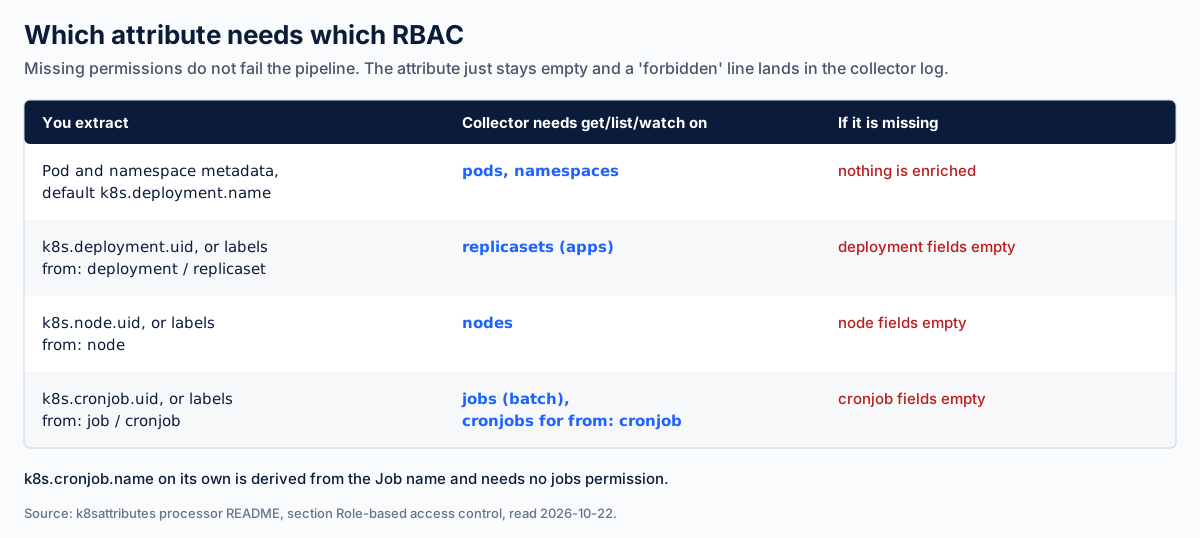
Figure 2. The permission each kind of attribute needs, per the processor’s RBAC
section. Grant what your extract block asks for, not more.
The trap is not a missing permission as such. It is that incomplete RBAC does not break anything you would notice. The pipeline keeps running, data keeps arriving, and the attribute is simply absent. The only evidence is a “forbidden” error in the collector’s own log, which nobody reads while the dashboards are green.
Two habits catch it:
- After every change to the collector config or its ServiceAccount, query for
pod metrics that lack
k8s.deployment.name,k8s.statefulset.nameandk8s.daemonset.nameat the same time. Bare pods aside, that set should be empty. - Alert on “forbidden” in the collector logs, the same way you alert on failed exports.
Match, keep, drop, promote
Once enrichment works, the next problem is having too much of it. An attribute can do three different jobs, and the one that is perfect for one job is often wrong for the next.
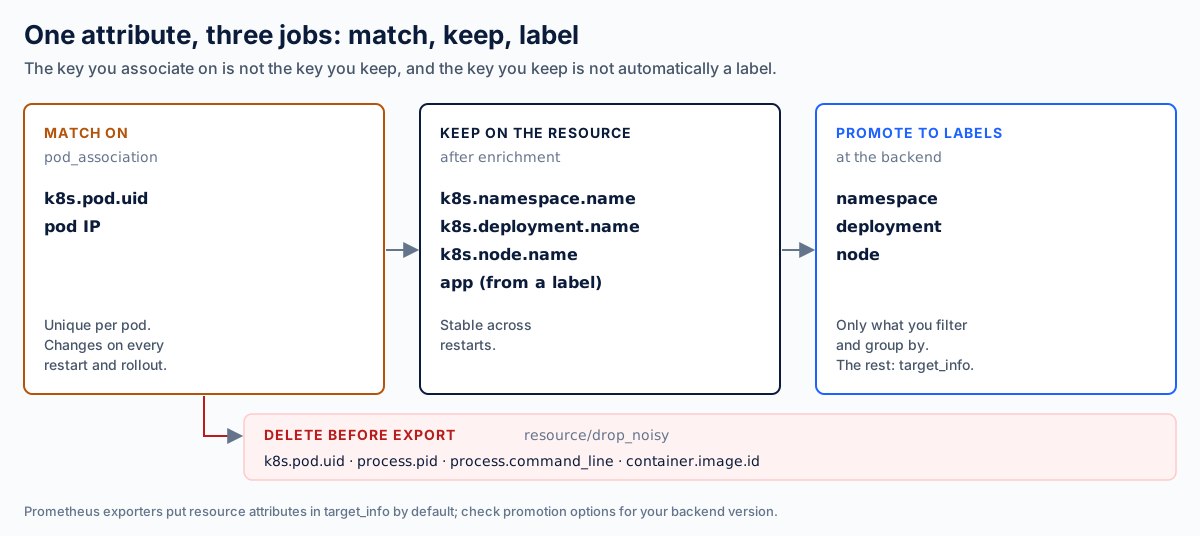
Figure 3. The pod UID is the best key to match on and one of the worst to keep.
Match on what is unique. k8s.pod.uid identifies exactly one pod, which is
why association uses it.
Do not export what changes on every rollout. The same uniqueness makes the UID a poor thing to store: every restart creates a new value, and every new value is a new series in a metrics backend. Delete it once, after enrichment and before the last export hop, together with other high-churn process attributes:
processors:
  resource/drop_noisy:
    attributes:
      - { key: k8s.pod.uid, action: delete }
      - { key: process.pid, action: delete }
      - { key: process.command_line, action: delete }
      - { key: container.image.id, action: delete }

service:
  pipelines:
    metrics:
      receivers: [ kubeletstats, otlp ]
      processors: [ memory_limiter, k8sattributes, resource/drop_noisy, batch ]
      exporters: [ otlp ]
Keep the stable names. Namespace, Deployment, node and one or two labels such
as app survive restarts and answer the questions people actually ask.
Promote to labels only what you filter by. This is the label trap. A resource
attribute is not automatically a metric label. With the Prometheus and
Prometheus remote write exporters, resource attributes land by default in a
separate target_info metric that you join at query time. You can turn all of
them into labels on every series, which works and multiplies cardinality. Or you
can promote a short list: Prometheus 3.x does this for OTLP ingestion with
promote_resource_attributes, and the transform processor can copy individual
attributes into data point attributes. Option names move between versions, so
check them against yours. Namespace, Deployment and node are usually the list.
A checklist before you roll it out
pod_associationhas ak8s.pod.uidrule for kubelet data and aconnectionrule for OTLP from pods.- Agents filter to their own node with
node_from_env_var, fed by the downward API. k8sattributessits beforebatchin every pipeline that uses aconnectionrule.- RBAC grants exactly what the
extractblock needs (Figure 2). - A query for pod metrics with no workload owner returns nothing, and “forbidden” in the collector log raises an alert.
- The pod UID and process attributes are deleted before export.
- Only the attributes you filter by become metric labels.
Most of this is collector configuration that has to be identical on every node and
every cluster. That is the part where a fleet drifts: one cluster gets the new
RBAC, another keeps last quarter’s extract block. LinkMesh manages OpenTelemetry
Collector configuration across a fleet, with staged
rollout and rollback and
drift detection, so a change like the one
above lands everywhere or nowhere. For where the agent and the gateway sit in the
first place, see Collector deployment patterns.
Sources
- OpenTelemetry Collector Contrib: k8sattributes processor README, sections on pod association, deployment name derivation, RBAC and deployment scenarios. Read 2026-10-22.
- OpenTelemetry Collector Contrib: kubeletstats receiver.
- Prometheus: Using Prometheus as your OpenTelemetry backend, on resource attribute promotion.
- OpenSight: Kubernetes monitoring, the full layer-by-layer guide.